Support & Community > Plans and billing
Add-on credits
# Add-on credits Add-on credits let you continue using premium AI models even after you've reached your monthly credit limit — at lower rates and with more control over spending. You can also buy them on the Free plan without subscribing. In the Warp app, you can manage and purchase add-on credits directly in **Settings** > **Billing and usage**.  ### How do add-on credits work? Add-on credits extend your AI usage beyond the included monthly quota in your plan. Once your plan’s credits are used up, Warp will automatically begin drawing from your available add-on credits. If you’ve enabled **auto-reload**, new credits will be added automatically and billed based on your selected configuration of monthly spending limit and selected purchase amount. Add-on credits are available on every self-serve plan — Free, Build, Max, and Business — plus Enterprise (with custom pricing). Paid self-serve plans buy at list price; the Free plan buys the same packs at a higher rate, described in [Buying add-on credits on the Free plan](#buying-add-on-credits-on-the-free-plan). On self-serve plans, add-on credits are scoped to each individual user; Enterprise uses a team-pooled model. These credits **roll over across billing cycles** and remain valid for **12 months from the purchase date**. Add-on credits draw from the same pool as [platform credits](/support-and-community/plans-and-billing/platform-credits/) and compute credits, so a single balance covers all three credit types. ### Who can purchase add-on credits Any active member of a team can purchase add-on credits for their own usage. You don't need to be a team admin, and you don't need a paid subscription. Credits you buy are scoped to you, so they only draw down for your own usage. Team admins keep the controls that govern team-wide spending: * **Team-wide monthly spend cap** - Caps what the whole team can spend on add-on credits per calendar month, across all members. The default is $200. Admins set it in the Warp app under **Settings** > **Billing and usage**. * **Auto-reload** - When an admin turns auto-reload on, it governs every purchase on the team, and individual members can no longer buy add-on credits manually. * **The team's payment method** - Every add-on credit purchase charges the payment method saved for the team. Only team admins can change or remove it, through the billing portal. See [How do I manage my billing?](/support-and-community/plans-and-billing/pricing-faqs/#how-do-i-manage-my-billing). :::caution A purchase made by one member is billed to whichever card the team already has on file, which may be a card a different member added. If you don't want your card used this way, ask a team admin to replace or remove it in the billing portal, or email [billing@warp.dev](mailto:billing@warp.dev). ::: ### Purchasing add-on credits You have two options for purchasing more credits: #### 1. Buy on-demand You can purchase additional add-on credits at any time directly within the app under **Settings** > **Billing and usage**. Buying more credits upfront provides a larger discount. The table below shows the available credit denominations, their prices, and corresponding discounts: <table><thead><tr><th width="115.21023559570312">Credits</th><th width="194.0745849609375">Price (USD)</th><th>Price per Credit</th><th>Discount</th></tr></thead><tbody><tr><td>400</td><td>$10</td><td>$0.025</td><td>Base rate</td></tr><tr><td>1,000</td><td>$20</td><td>$0.020</td><td>20% off</td></tr><tr><td>3,000</td><td>$50</td><td>$0.016</td><td>~35% off</td></tr><tr><td>6,500</td><td>$100</td><td>$0.0153</td><td>~40% off</td></tr></tbody></table> #### 2. Enable auto-reload Auto-reload automatically purchases more credits whenever your balance reaches **100 credits**, ensuring uninterrupted access to premium AI features. By default, **auto-reload is disabled for new subscribers**. When you turn it on, it starts with a **$200 monthly spend limit**, which you can adjust anytime in **Settings** > **Billing and usage**. Auto-reload uses the same denominations and discounts as manual purchases. The denomination you select (e.g., 400, 1,000, 3,000, or 6,500 credits) will repeat each time your balance is depleted, up to your monthly spending limit. Larger denominations offer up to ~40% off per credit. :::note You can opt in and choose your reload amount when subscribing to a paid plan on the [Warp upgrade page](https://app.warp.dev/upgrade), or change your configuration anytime in **Settings** > **Billing and usage**. ::: #### **Configuring a monthly spend limit** Your monthly spend limit sets the maximum amount you can spend on add-on credits in a single calendar month. This ensures you have full control over your AI usage costs while still allowing flexibility for automatic top-ups when needed, keeping your workflow uninterrupted. * The default limit is $200, but you can increase or decrease it anytime in **Settings** > **Billing and usage**. * **If a credit purchase would exceed your limit, it won’t process** — you’ll need to either raise your limit or choose a smaller add-on credit amount. * Once your limit is reached, no additional add-on credit purchases (manual or automatic) will occur until: * The next calendar month begins, or * You update your limit in settings. :::caution Your monthly spend limit is separate from your billing cycle (which determines when your subscription renews).\ \ The limit resets automatically at the start of each calendar month, so you can manage recurring AI usage with predictable spending and clear visibility into your costs. ::: ### Buying add-on credits on the Free plan You don't need a subscription to buy credits. On the Free plan you can purchase the same credit packs and spend them on any model, so a one-off top-up is an alternative to upgrading. Free plan packs cost 20% more than the paid-plan price. | Credits | Free plan price | Paid plan price | | --- | --- | --- | | 400 | $12 | $10 | | 1,000 | $24 | $20 | | 3,000 | $60 | $50 | | 6,500 | $120 | $100 | Upgrading to a [paid plan](https://www.warp.dev/pricing) drops you to the paid-plan price and adds a monthly credit allowance on top. #### Making a Free plan purchase Because a Free plan team has no card on file, the first purchase collects payment details through Stripe Checkout instead of charging silently. 1. Start the purchase. In the Warp app, go to **Settings** > **Billing and usage**, choose a denomination, then click **One-time purchase**. On the web, open the [Warp upgrade page](https://app.warp.dev/upgrade) and use the **Add-on credits** card below the plan cards. 2. Complete Stripe Checkout in your browser. The checkout link expires after 30 minutes; if it does, start the purchase again. 3. Return to Warp. Your credits are granted as soon as checkout completes, and your new balance appears under **Settings** > **Billing and usage**. If you aren't on a team yet, Warp creates a personal team named after your email address (for example, `you@example.com's Team`) and applies the purchase to it. You're the admin of that team, so you control its billing. #### The card you enter is saved for the team Stripe saves the card you use at checkout, and Warp sets it as the team's default payment method. From that point on: * **Later purchases skip checkout** - Add-on credit purchases on that team charge the saved card directly, including purchases made by other team members and any auto-reload an admin turns on. * **Only admins can change it** - Team admins update or remove the saved card in the billing portal. Non-admin members can't open the billing portal. See [How do I manage my billing?](/support-and-community/plans-and-billing/pricing-faqs/#how-do-i-manage-my-billing). * **The spend cap still applies** - The team-wide monthly spend cap (default $200) limits total add-on credit spending per calendar month, whoever makes the purchase. On a shared team, that means one member's card can end up funding another member's purchase. If that isn't what you want, ask a team admin to replace or remove the saved card, lower the team-wide spend cap, or email [billing@warp.dev](mailto:billing@warp.dev) for help. ### Billing and credit usage When your monthly credit balance renews: 1. Warp first consumes your included monthly credits (e.g., Build plan credits). 2. After those are used, Warp continues to draw from any available add-on credits. 3. If your add-on credits run out and auto-reload is enabled, Warp will automatically purchase more up to your monthly limit. You can track your remaining credits and spending in the credits transparency footer and in **Settings** > **Billing and usage**. #### Teams using add-on credits On self-serve plans (Free, Build, Max, and Business), add-on credits are scoped to individual users. Each team member's add-on credits draw down only for their own usage. Team admins manage add-on credit settings for the team in **Settings** > **Billing and usage**: * **Team-wide spend cap** — Sets the maximum amount the team can spend on add-on credits per calendar month, applied across all members. * **Auto-reload** — When enabled, the admin selects an add-on credit denomination for the team. Warp automatically purchases that denomination for any user whose add-on credit balance drops below 100 credits, subject to the team-wide spend cap. While auto-reload is on, individual users cannot purchase add-on credits manually. * **Manual purchases** — When auto-reload is off, eligible team members can purchase add-on credits for themselves, as long as the team stays below the team-wide spend cap. For how cloud agent runs that aren't initiated by a specific team member (scheduled runs, agent API key runs) are billed, see [How are cloud agent runs on team plans billed when no individual user triggered them?](/support-and-community/plans-and-billing/pricing-faqs/#how-are-cloud-agent-runs-on-team-plans-billed-when-no-individual-user-triggered-them) in the Pricing FAQs. ### Plan changes and cancellations Any purchased add-on credits remain in your account and can continue to be used for up to 12 months after purchase. If you move to the Free plan, your remaining add-on credits aren't removed and they keep their original 12-month expiration from the purchase date. You can keep spending them on the Free plan, and you can buy more at the Free plan rate described in [Buying add-on credits on the Free plan](#buying-add-on-credits-on-the-free-plan). Re-subscribing on the same team restores the paid-plan rate for new purchases. :::caution Add-on credits are tied to your team. Leaving the team, being removed by an admin, or having the team deleted revokes your access to any credits tied to that team. ::: #### When team membership changes Add-on credits are tied to the team they were purchased under. The flows below describe what happens in common team-membership scenarios: * **A user leaves a team** - You lose access to any add-on credits tied to that team. If you rejoin the same team later, you regain access to any unused, non-expired credits. The admin pays a prorated rate for your seat on rejoin. * **An admin removes a member** - That member loses access to any add-on credits tied to the team. If they rejoin later, they regain access to any unused, non-expired credits. * **An admin deletes the team** - Any remaining add-on credits must be used or removed before a team can be deleted. Contact [support@warp.dev](mailto:support@warp.dev) if you need help with this. :::note All unused add-on credits remain valid for 12 months from purchase, and they stay tied to the team they were purchased under. :::Tell me about this feature: https://docs.warp.dev/support-and-community/plans-and-billing/add-on-credits/Purchase add-on credits to keep using premium AI models after reaching your monthly credit limit, or to top up on the Free plan without subscribing.
Add-on credits let you continue using premium AI models even after you’ve reached your monthly credit limit — at lower rates and with more control over spending. You can also buy them on the Free plan without subscribing.
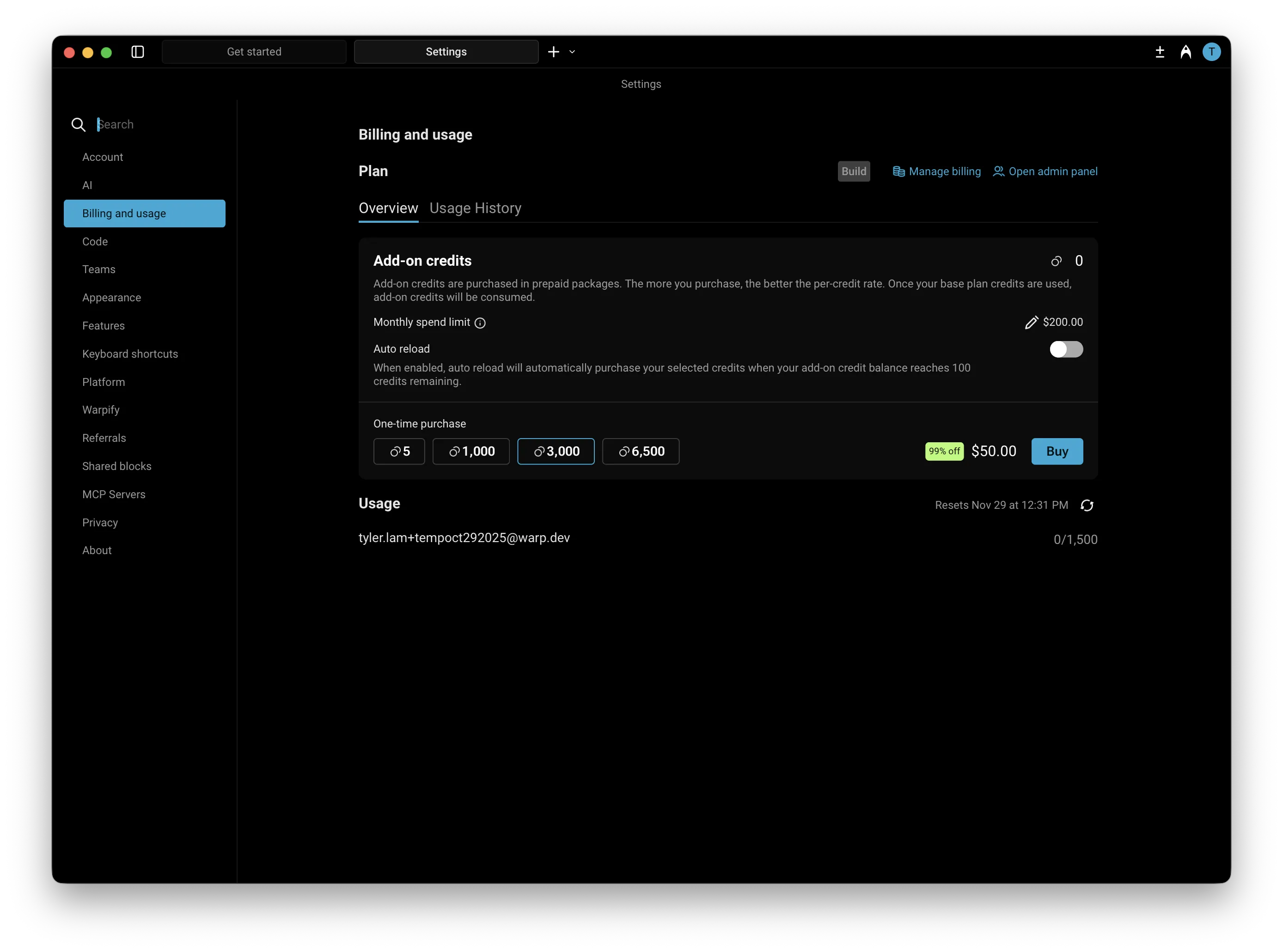
In the Warp app, you can manage and purchase add-on credits directly in Settings > Billing and usage.
How do add-on credits work?
Section titled “How do add-on credits work?”Add-on credits extend your AI usage beyond the included monthly quota in your plan. Once your plan’s credits are used up, Warp will automatically begin drawing from your available add-on credits.
If you’ve enabled auto-reload, new credits will be added automatically and billed based on your selected configuration of monthly spending limit and selected purchase amount.
Add-on credits are available on every self-serve plan — Free, Build, Max, and Business — plus Enterprise (with custom pricing). Paid self-serve plans buy at list price; the Free plan buys the same packs at a higher rate, described in Buying add-on credits on the Free plan. On self-serve plans, add-on credits are scoped to each individual user; Enterprise uses a team-pooled model. These credits roll over across billing cycles and remain valid for 12 months from the purchase date.
Add-on credits draw from the same pool as platform credits and compute credits, so a single balance covers all three credit types.
Who can purchase add-on credits
Section titled “Who can purchase add-on credits”Any active member of a team can purchase add-on credits for their own usage. You don’t need to be a team admin, and you don’t need a paid subscription. Credits you buy are scoped to you, so they only draw down for your own usage.
Team admins keep the controls that govern team-wide spending:
- Team-wide monthly spend cap - Caps what the whole team can spend on add-on credits per calendar month, across all members. The default is $200. Admins set it in the Warp app under Settings > Billing and usage.
- Auto-reload - When an admin turns auto-reload on, it governs every purchase on the team, and individual members can no longer buy add-on credits manually.
- The team’s payment method - Every add-on credit purchase charges the payment method saved for the team. Only team admins can change or remove it, through the billing portal. See How do I manage my billing?.
Purchasing add-on credits
Section titled “Purchasing add-on credits”You have two options for purchasing more credits:
1. Buy on-demand
Section titled “1. Buy on-demand”You can purchase additional add-on credits at any time directly within the app under Settings > Billing and usage. Buying more credits upfront provides a larger discount.
The table below shows the available credit denominations, their prices, and corresponding discounts:
| Credits | Price (USD) | Price per Credit | Discount |
|---|---|---|---|
| 400 | $10 | $0.025 | Base rate |
| 1,000 | $20 | $0.020 | 20% off |
| 3,000 | $50 | $0.016 | ~35% off |
| 6,500 | $100 | $0.0153 | ~40% off |
2. Enable auto-reload
Section titled “2. Enable auto-reload”Auto-reload automatically purchases more credits whenever your balance reaches 100 credits, ensuring uninterrupted access to premium AI features.
By default, auto-reload is disabled for new subscribers. When you turn it on, it starts with a $200 monthly spend limit, which you can adjust anytime in Settings > Billing and usage.
Auto-reload uses the same denominations and discounts as manual purchases. The denomination you select (e.g., 400, 1,000, 3,000, or 6,500 credits) will repeat each time your balance is depleted, up to your monthly spending limit. Larger denominations offer up to ~40% off per credit.
Configuring a monthly spend limit
Section titled “Configuring a monthly spend limit”Your monthly spend limit sets the maximum amount you can spend on add-on credits in a single calendar month. This ensures you have full control over your AI usage costs while still allowing flexibility for automatic top-ups when needed, keeping your workflow uninterrupted.
- The default limit is $200, but you can increase or decrease it anytime in Settings > Billing and usage.
- If a credit purchase would exceed your limit, it won’t process — you’ll need to either raise your limit or choose a smaller add-on credit amount.
- Once your limit is reached, no additional add-on credit purchases (manual or automatic) will occur until:
- The next calendar month begins, or
- You update your limit in settings.
Buying add-on credits on the Free plan
Section titled “Buying add-on credits on the Free plan”You don’t need a subscription to buy credits. On the Free plan you can purchase the same credit packs and spend them on any model, so a one-off top-up is an alternative to upgrading. Free plan packs cost 20% more than the paid-plan price.
| Credits | Free plan price | Paid plan price |
|---|---|---|
| 400 | $12 | $10 |
| 1,000 | $24 | $20 |
| 3,000 | $60 | $50 |
| 6,500 | $120 | $100 |
Upgrading to a paid plan drops you to the paid-plan price and adds a monthly credit allowance on top.
Making a Free plan purchase
Section titled “Making a Free plan purchase”Because a Free plan team has no card on file, the first purchase collects payment details through Stripe Checkout instead of charging silently.
- Start the purchase. In the Warp app, go to Settings > Billing and usage, choose a denomination, then click One-time purchase. On the web, open the Warp upgrade page and use the Add-on credits card below the plan cards.
- Complete Stripe Checkout in your browser. The checkout link expires after 30 minutes; if it does, start the purchase again.
- Return to Warp. Your credits are granted as soon as checkout completes, and your new balance appears under Settings > Billing and usage.
If you aren’t on a team yet, Warp creates a personal team named after your email address (for example, you@example.com's Team) and applies the purchase to it. You’re the admin of that team, so you control its billing.
The card you enter is saved for the team
Section titled “The card you enter is saved for the team”Stripe saves the card you use at checkout, and Warp sets it as the team’s default payment method. From that point on:
- Later purchases skip checkout - Add-on credit purchases on that team charge the saved card directly, including purchases made by other team members and any auto-reload an admin turns on.
- Only admins can change it - Team admins update or remove the saved card in the billing portal. Non-admin members can’t open the billing portal. See How do I manage my billing?.
- The spend cap still applies - The team-wide monthly spend cap (default $200) limits total add-on credit spending per calendar month, whoever makes the purchase.
On a shared team, that means one member’s card can end up funding another member’s purchase. If that isn’t what you want, ask a team admin to replace or remove the saved card, lower the team-wide spend cap, or email billing@warp.dev for help.
Billing and credit usage
Section titled “Billing and credit usage”When your monthly credit balance renews:
- Warp first consumes your included monthly credits (e.g., Build plan credits).
- After those are used, Warp continues to draw from any available add-on credits.
- If your add-on credits run out and auto-reload is enabled, Warp will automatically purchase more up to your monthly limit.
You can track your remaining credits and spending in the credits transparency footer and in Settings > Billing and usage.
Teams using add-on credits
Section titled “Teams using add-on credits”On self-serve plans (Free, Build, Max, and Business), add-on credits are scoped to individual users. Each team member’s add-on credits draw down only for their own usage.
Team admins manage add-on credit settings for the team in Settings > Billing and usage:
- Team-wide spend cap — Sets the maximum amount the team can spend on add-on credits per calendar month, applied across all members.
- Auto-reload — When enabled, the admin selects an add-on credit denomination for the team. Warp automatically purchases that denomination for any user whose add-on credit balance drops below 100 credits, subject to the team-wide spend cap. While auto-reload is on, individual users cannot purchase add-on credits manually.
- Manual purchases — When auto-reload is off, eligible team members can purchase add-on credits for themselves, as long as the team stays below the team-wide spend cap.
For how cloud agent runs that aren’t initiated by a specific team member (scheduled runs, agent API key runs) are billed, see How are cloud agent runs on team plans billed when no individual user triggered them? in the Pricing FAQs.
Plan changes and cancellations
Section titled “Plan changes and cancellations”Any purchased add-on credits remain in your account and can continue to be used for up to 12 months after purchase.
If you move to the Free plan, your remaining add-on credits aren’t removed and they keep their original 12-month expiration from the purchase date. You can keep spending them on the Free plan, and you can buy more at the Free plan rate described in Buying add-on credits on the Free plan. Re-subscribing on the same team restores the paid-plan rate for new purchases.
When team membership changes
Section titled “When team membership changes”Add-on credits are tied to the team they were purchased under. The flows below describe what happens in common team-membership scenarios:
- A user leaves a team - You lose access to any add-on credits tied to that team. If you rejoin the same team later, you regain access to any unused, non-expired credits. The admin pays a prorated rate for your seat on rejoin.
- An admin removes a member - That member loses access to any add-on credits tied to the team. If they rejoin later, they regain access to any unused, non-expired credits.
- An admin deletes the team - Any remaining add-on credits must be used or removed before a team can be deleted. Contact support@warp.dev if you need help with this.